






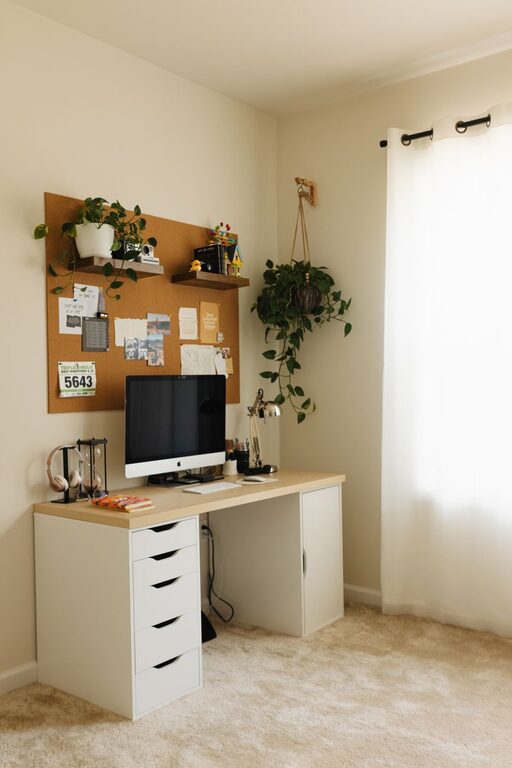
Creating a cozy and functional home workspace can significantly enhance your productivity and overall well-being. Whether you work remotely full-time or need an area to focus on side projects, having a dedicated space that feels welcoming and is organized for efficiency is key. In this post, we’ll explore practical tips and ideas to help you set up a home workspace that balances comfort with functionality.
Why Your Workspace Matters
Your home office or workspace is more than just a place to put your laptop. It’s where ideas take shape, tasks get done, and creativity flows. When designed thoughtfully, it can reduce distractions, improve focus, and make work feel less like a chore. A cozy environment supports your mental comfort, while functionality ensures you have everything you need within reach.
1. Choose the Right Location
Start by selecting the best spot for your workspace.
– Quiet and Low-Traffic Areas: Pick a corner or room where you’re less likely to be interrupted by household noise or activity.
– Natural Light: Position your desk near a window, if possible. Natural light has been shown to boost mood and energy.
– Space Considerations: Ensure there’s enough room for your desk, chair, and any additional equipment without feeling cramped.
If space at home is limited, even a small nook or a section of your dining table can work well with the right setup.
2. Invest in Comfortable Furniture
Comfort is crucial since you’ll be spending a lot of time sitting and working.
– Ergonomic Chair: Choose a chair with good lumbar support, adjustable height, and comfortable padding to prevent back pain.
– Desk Height: Make sure your desk is at a height where your arms can rest comfortably while typing. Adjustable desks or standing desk options are great choices.
– Footrest: If your feet don’t reach the ground comfortably, using a small footrest can improve posture.
Remember, your comfort directly impacts your ability to focus and avoid fatigue.
3. Organize Your Space Efficiently
A clutter-free workspace helps maintain mental clarity.
– Storage Solutions: Use shelves, drawers, or filing cabinets to keep documents and supplies organized.
– Desk Organizers: Trays, pen holders, and cable organizers help keep your desktop neat and accessible.
– Regular Decluttering: Schedule a weekly tidying session to clear unnecessary items.
Labeling storage bins or folders can also save time searching for supplies or papers.
4. Personalize Your Workspace
Adding some personal touches can make your workspace inviting and motivating.
– Plants: Small indoor plants improve air quality and add life to the room.
– Artwork or Photos: Decorate with calming artwork or inspiring photos to create a positive atmosphere.
– Comfort Items: A cozy throw blanket, cushions, or even a scented candle can make your space feel more like your own.
Avoid overdecorating to keep the environment professional and focused.
5. Optimize Lighting
Good lighting reduces eye strain and keeps you alert.
– Natural Light: As mentioned, position yourself near windows when possible.
– Task Lighting: Use adjustable desk lamps to focus light where you need it most.
– Ambient Light: Soft overhead lighting can balance the brightness and prevent harsh shadows.
Consider using bulbs that mimic daylight for the best effect.
6. Minimize Distractions
Creating boundaries between work and home life is vital in a shared space.
– Noise Control: Use noise-canceling headphones or play background music to drown out disruptive sounds.
– Visual Barriers: Room dividers or curtains can separate your workspace visually from the rest of your home.
– Digital Focus Tools: Employ apps or settings to limit notifications and block distracting websites during work hours.
Communicate your work schedule to family or roommates so they know when not to disturb you.
7. Keep Necessary Tech and Supplies Within Reach
Efficiency improves when you don’t have to constantly get up for things.
– Laptop/Monitor Setup: Invest in a good monitor and adjustable stand to maintain good posture.
– Keyboard and Mouse: Ergonomic models reduce strain.
– Charging Stations: Keep cables organized and charging devices close by.
– Office Supplies: Pens, notebooks, and other essentials should be easily accessible but not cluttering.
8. Incorporate Break and Movement Areas
Even in a small workspace, take time to move and reset.
– Stretch Space: Leave room to stand and stretch regularly.
– Break Spot: If possible, have a cozy chair or corner nearby for quick mental breaks.
– Hydration Station: Keep a water bottle handy to stay hydrated throughout the day.
Regular breaks contribute to sustained focus and prevent burnout.
Final Thoughts
Designing a cozy and functional home workspace is an investment in your productivity and comfort. By carefully selecting your location, investing in good furniture, organizing efficiently, and personalizing your space, you create an environment that supports your best work. Remember to balance focus and relaxation, and tailor your workspace to your unique needs and style.
With these tips, you’re well on your way to creating a home office that feels inviting and keeps you motivated. Happy decorating!